Quick Start
From setup to delivery in 10 minutes
Follow these steps to run your first event and deliver photos automatically to every guest.
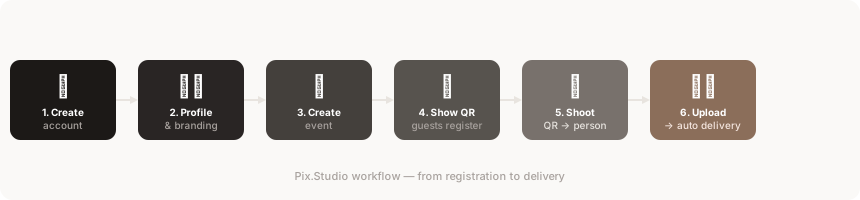
Create your account
Register at pix.studio/app — it's free. No credit card required to get started.
Set up your profile
Add your name and logo. Your name appears on guest registration forms and in delivery emails; on paid plans your logo appears on registration forms and in galleries.
Learn more →Create an event
Type a name into the 'Create new event' field on the Home tab and save. The new event becomes active right away — you can change the guest language in the event's settings.
Learn more →Show the QR code
Display your event's QR code on a screen or print it out. Guests scan it to register.
Learn more →Guests register
Each guest enters their name and email on their phone and receives a personal QR code on screen.
Learn more →Photograph the QR, then the person
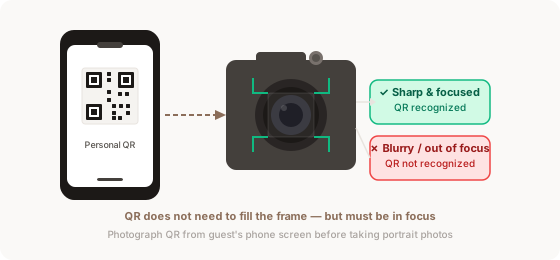
Aim at the QR code on the guest's phone screen and take one photo. Then photograph the person normally. The system links all following photos to that guest.
The QR code must be sharp in your photo. It does not need to fill the entire frame, but it must be in focus.
For group photos, photograph each person's QR code one by one without taking a regular photo in between — or place all QR cards together in one frame. Every photo taken after the last QR photo goes to the whole group. Learn more →
Upload photos — delivery is automatic
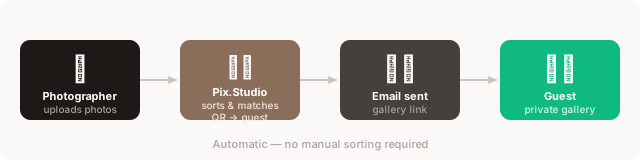
Upload your photos from camera to Pix.Studio. The system matches each person's photos and delivers them to their email automatically.